
CS125: Introduction to Programming Principles
Lab 02
Download files
Download the L02.zip file and extract the files to your cs125 folder on your home directory. You will use these files to complete this week's lab exercises.
NOW, FOLLOW THE INSTRUCTIONS here (Mac instructions) or here (PC instructions). Make sure to follow these instructions carefully, as you will need these files for every assignment. Once this process is completed, you will not have to do it again.
What you should know
This lab covers lecture 3. You are expected to know about the Board class and screen output. A quick overview is given here.
Correcting errors
Open the file Lab02Errors.java in DrJava and try to run it. You will get errors when attempting to run the program. Fix all the errors in the program so that it has sensible output, and run it again. Once you have the program working correctly and it has what you think to be the correct output, copy and paste all the code on the screen into the text box below and click submit. Be sure that you copy ALL OF THE CODE on the screen. An easy way to do this is to click 'Edit --> Select All' or to use the apple-a shortcut on the keyboard. When the code is highlighted, copy (apple-c) and paste (apple-v) it below.
Submit the output of the program below (i.e. whatever appears in the 'Interactions' window at the bottom of DrJava). Be sure to get all of the output for the program.
Calling methods
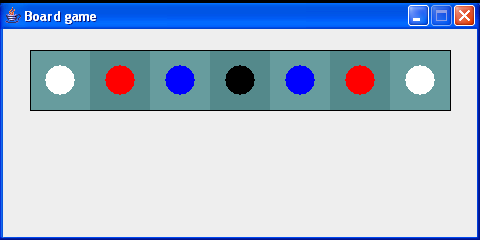 Open the file Lab02Board.java in DrJava. Using the provided file, create a new 1-dimensional
Board with 7 cells (you are using the same Board class that you have seen
in lecture). Write code to put pegs on the board to match the picture to the right (Note: The order is White-Red-Blue-Black-Blue-Red-White).
Once done, run your code. If it is correct, copy ALL THE CODE in your Lab02Board.java file and
paste it below. (If stuck on what to copy and paste, refer to previous submit instructions above.)
Open the file Lab02Board.java in DrJava. Using the provided file, create a new 1-dimensional
Board with 7 cells (you are using the same Board class that you have seen
in lecture). Write code to put pegs on the board to match the picture to the right (Note: The order is White-Red-Blue-Black-Blue-Red-White).
Once done, run your code. If it is correct, copy ALL THE CODE in your Lab02Board.java file and
paste it below. (If stuck on what to copy and paste, refer to previous submit instructions above.)
Small-scale programming exercises
Open the file Lab02Small.java in DrJava and create the program described in the comments. You should declare additional variables as they are needed.
Once you have completed the program, copy
Request lab solutions
If you request solutions for this lab, you will be sent an email that contains your answers as well as the expected answers. The email will be sent out to all interested students once the deadline for completing the exercises has passed for all students. Only the solutions to the questions you have attempted will be sent to you.