CS125: Introduction to Programming Principles
What You Should Know
Objects: We have already been using objects throughout the term. Two objects you should be very familiar with are String and Board. Now its time that you build an object yourself. First we start of with classes.
So what is a class? A class is like a blueprint. It allows you to build the object. From a single blue print you can create multiple objects. For the purposes of this review we will be using a class called Computer. An example of a class is shown below.
	public Class Computer {

	}
The above is the class definition. Next we will add some instances variables. Instances variables can be public or private, but for the duration of this course we will only deal with private instances variables. We will however be dealing with public/private methods and we will go into detail with them in a bit. With a few private instance variables are new class definition is:
	public Class Computer {
		private int speed;
		private String company;
	}
Now, before we can use those variables we need to initalize them. Let's say we want them to be automatically initialized and setup the moment we run our class. To do this we make what is called a constructor. A constructor is a special method that is called as soon as an object is created. It should never be called again. The name of our constructor should always be the same as the name of the class. So now we have:
	public Class Computer {
		private int speed;
		private String Company;

		public Computer(int theSpeed, String theCompany)
		{
			speed = theSpeed;
			Company = theCompany;
		}
	}
This allows us, when creating the object, to supply a set of values to the variables inside the object. Remember that all objects are different. They are created from the same blueprint, but once created they can be changed and modified.
Now we will look at methods. Methods are actions that can be performed on our object. They can do many things, but we will only look at mutator and accessor methods (two specific types of methods with fancy names, all other methods are built the same way these two methods are).
A method can be public or private. A public method is a method that can be accessed at any time. A private method is a method that can only be accessed from with in this object. You will deal with this more in the future. For now are methods will be public. A method definition resembles:
	public <return type> <method name>(<parameters>)
	{
		// method code (performs a task)
	}
The return type is the type of data being returned. E.g. you could return an int, a String, anything you want. If you want to return nothing then you use the word void as the return type. If you have a return type other then void, then you must always return something.
The parameters are data that you can take into the method to operate on or with. If you want to take in no data then you leave this area empty.
So for an accessor method (a method that allows us to access a private variable) we would have a return type of which ever type of variable we were looking at. So if we were making an accessor method for the Company instance variable we would need to return a String. An example of this accessor method would be:
	public String getCompany()
	{
		return this.company;
	}
So this method called getCompany, returns a string, and takes in no parameters. Now, if we want to make a mutator method (a method that allows us to change private variables in the object) we would not be returning anything, but we would be accepting a parameter. This would resemble:
	public void setCompany(String newCompany)
	{
		This.theCompany = newCompany;
	}
Now putting everything together our final class looks like:
	public class Computer {
		private int speed;
		private String Company;

		public Computer(int theSpeed, String theCompany)
		{
			speed = theSpeed;
			Company = theCompany;
		}

		public String getCompany()
		{
			return this.company;
		}
		public void setCompany(String newCompany)
		{
			this.theCompany = newCompany;
		}
	}
Now if we want to create this object. In our main we would type:
	Computer a;	// this declares a references that will point to the new object
	a = new Computer(2, "Toshiba"); // this initalizes the object and tells java to call
					      // the constructor
	We could also go
	Computer b;
	b = new Computer(2, "Toshiba");
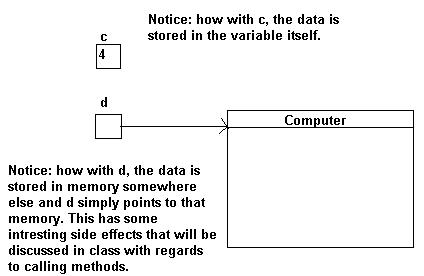
We now have two objects. They contain the exact same information, but they are both two different objects in memory. Both references a and b point to two different areas in memory. Lets take a quick look at whats actually happening in memory now. Say we went:
		int c = 4;
		Computer d = new Computer(2, "Toshiba");
Both of these commands will cause the computer to store data. The d variable however is a reference. It references a large chunk of memory. This area of memory contains more then just a single number, it can contains string, characters, other objects, and anything we want. It also contains methods to operate on the data being pointed to. In memory this could conceptually be thought of as the picture below:
Lets revisit why we can use "==" on primitives and have to use .equals with objects.
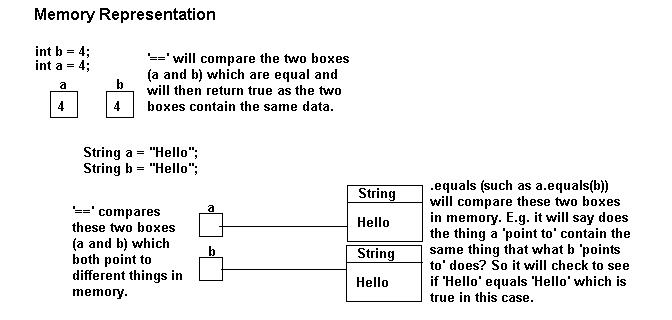
A quick note about .equals and ==. The == is used for comparing primitives. The .equals is used for comparing the contents of an object. If I used '==' with a string as opposed to .equals, it would only tell me if the two strings being compared pointed to the same memory location. It would not tell me whther the contents of the memory location were equal or not. Please see the below diagram for more information.