
CS125: Introduction to Programming Principles
Lab 12
PLEASE NOTE: All lab exercises are Monday August 28th, by 10:00am.- Download Files
- Extended Board
- Context
- Extending a class
- Method Resolution 1
- Method Resolution 2
- Request Lab Solutions
Download Files
Download the L12.zip file and extract
the files to your cs125 folder in your home directory.
You will use these files to complete this week's lab exercises.
Inheritance with the Board Class
One limitation of the Board class is that there are no accessor methods to return the peg at a given location on the board. In this lab, you will extend the Board class to correct this limitation, providing two new getPeg methods that return the String that represents the color of the peg on a specified square. In addition, you will override several existing methods in the Board class to track the information needed to implement the getPeg methods.
Open ExtendedBoard.java in DrJava. Notice that this class extends the Board class. The only new instance variable is a two-dimensional array of Strings named colorOfPegAt with which to record the color of the peg stored at each location on the board, or an empty String if there is no peg at a particular position.
The 1-D and 2-D constructors for ExtendedBoard should call the constructor for the superclass Board, then create and initialize colorOfPegAt.
Submit your code for the constructors in the box below.
The methods putPeg and removePeg should override the methods in the superclass to update the array colorOfPegAt as pegs are added and removed.
Submit your code for the putPeg and removePeg methods (4 methods in total) in the box below.
The getPeg methods return the color of the peg on the specified square. If the square is empty, the methods return an empty String.
Submit your code for the getPeg methods in the box below.
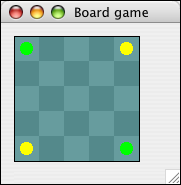
If your code is implemented correctly the main method in ExtendedBoard.java will draw the board shown below:
Some Context
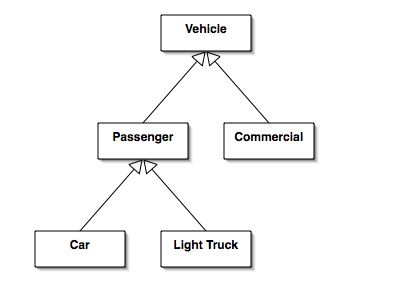
The remainder of this lab works with a hierarchy of vehicles that are used in a rental fleet. The hierarchy is illustrated below. Before you begin these exercises open each of the files in this week's lab and read them quickly.
Extending a Class
Create a new class Motorcycle.java that extends Passenger.java. Motorcycle.java should have the following characteristics.
- The ability to store the colour of the motorcycle as a String.
- The ability to store the top speed of the motorcycle as an integer.
- A constructor that corresponds to the creation of hotWheels in the main method in Fleet.java.
- Overrides the toString method. Use the toString method in LightTruck.java as a guide. Has a method modify which will change the colour of the motorcycle. Overloads the method modify so that it will change the top speed of the motorcycle.
To test your code, uncomment the first block of code in the main method in Fleet.java.
Submit Motorcycle.java here:
Method Resolution 1
Uncomment the second block of code in Fleet.java and compile the code. Run the main method in Fleet.java. Examine the output in the interactions pane. In the box below explain why different objects, all of type Vehicle, created different outputs from the toString method. Note that the answer has nothing to do with the value of the instance variables.
Submit your explanation here:
Method Resolution 2
Uncomment the third block of code in Fleet.java and compile the code.
The code will fail to compile.
Read the error message carefully.
Where is the error located? Why does that seem surprising?
NOTE: The material required to answer this question will be covered in Lecture 23 (Thursday).
Submit your answer here:
Request Lab Solutions
If you request solutions for this lab you will be sent an email that contains your answers as well as the expected answers. The email will be sent out to all interested students once the deadline for completing the exercises has passed for all students.