Appearance
Basic Types
TypeScript types are annotations that are checked at compile time, not runtime. They help identify errors early and improve the development experience with features like autocompletion and inline documentation.
Catching Errors
TypeScript integrates with editors like VS Code to highlight type errors and warnings. In VS Code, problematic code is underlined in red, and hovering shows a message explaining the issue. These messages also appear in the “Problems” panel.
Example 1: Type mismatch
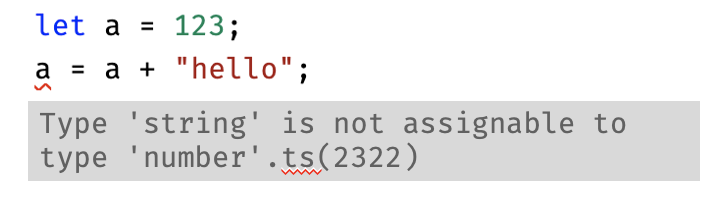
In this example, TypeScript infers that a is a number from its initial value 123. When you try to assign a + "hello" (which results in the string "123hello"), TypeScript shows an error because you can't assign a string to a variable that's typed as a number. This prevents the runtime error that would occur in JavaScript.
Example 2: Missing Property
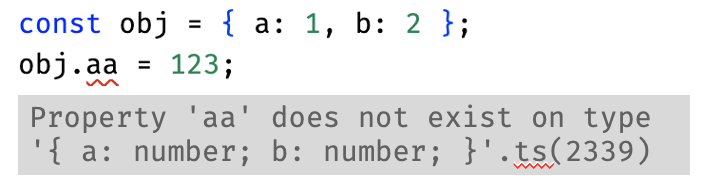
The object obj has a property called a, but the code mistakenly tries to access aa. This kind of typo is a common programming error that TypeScript catches at compile time, preventing runtime errors that would occur when code tries to access properties that don't exist.
Basic Type Annotations
You can explicitly specify the type of variables by adding a colon and type after the variable name:
ts
let n: number = 123;
let b: boolean = true;
let s: string = "Hello";
Other TypeScript type names include:
any– disables type checking for that variablevoid– for functions that don’t return anythingnullandundefined– represent the absence of a valueunknown– likeany, but requires type checking before usagenever– for values that never occur (e.g., a variable that can’t have any valid value)
Type Inference
TypeScript can often infer types automatically from the values you assign. When you don't specify a type, TypeScript looks at the initial value and infers the most specific type possible.
ts
// TypeScript infers the most specific type from the initial value:
let x = 123;        // x is inferred as number
let y = "hello";    // y is inferred as string
let z = true;       // z is inferred as boolean

// These variables can only hold values of their inferred type:
x = 456;           // OK - still a number
y = "world";       // OK - still a string
z = false;         // OK - still a boolean

// TypeScript errors when reassignment to different types:
// x = "abc";      // Error: Type 'string' is not assignable to type 'number'
// y = 123;        // Error: Type 'number' is not assignable to type 'string'
// z = "true";     // Error: Type 'string' is not assignable to type 'boolean'
The any Type
When you declare a variable without an initial value, TypeScript infers it as any:
ts
let x;              // x is inferred as 'any'
x = 123;           // OK
x = "hello";       // OK - x can be anything
x = true;          // OK - x can be anything
x = x + "world";   // works too, but can cause runtime bugs!
🛑 Warning: Implicit type assignment to
anydisables all TypeScript type checking for that variable. It makes your code vulnerable to the same runtime errors that TypeScript is designed to prevent. Use explicit types if no initial value.
🤔 The
unknowntype is a safer alternative toany. Likeany, it can hold any value, but unlikeany, it requires you to check the type before using the value. But in almost all cases, use explicit type annotations if no initial value.
ts
// Explicit type with no initial value:
let name: string;           // name is typed as string | undefined
let age: number;            // age is typed as number | undefined

// Later assignment:
name = "Alice";             // OK
age = 30;                   // OK

// TypeScript will warn about potential undefined:
// console.log(name.length); // Error: Object is possibly 'undefined'
// console.log(age + 5);     // Error: Object is possibly 'undefined'

// Safe usage requires checking:
if (name && age) {
  console.log(`${name} is ${age} years old`); // OK
}
External Resources